3 November 2026
Instagram Collab Posts: How Brands Use Them with Creators
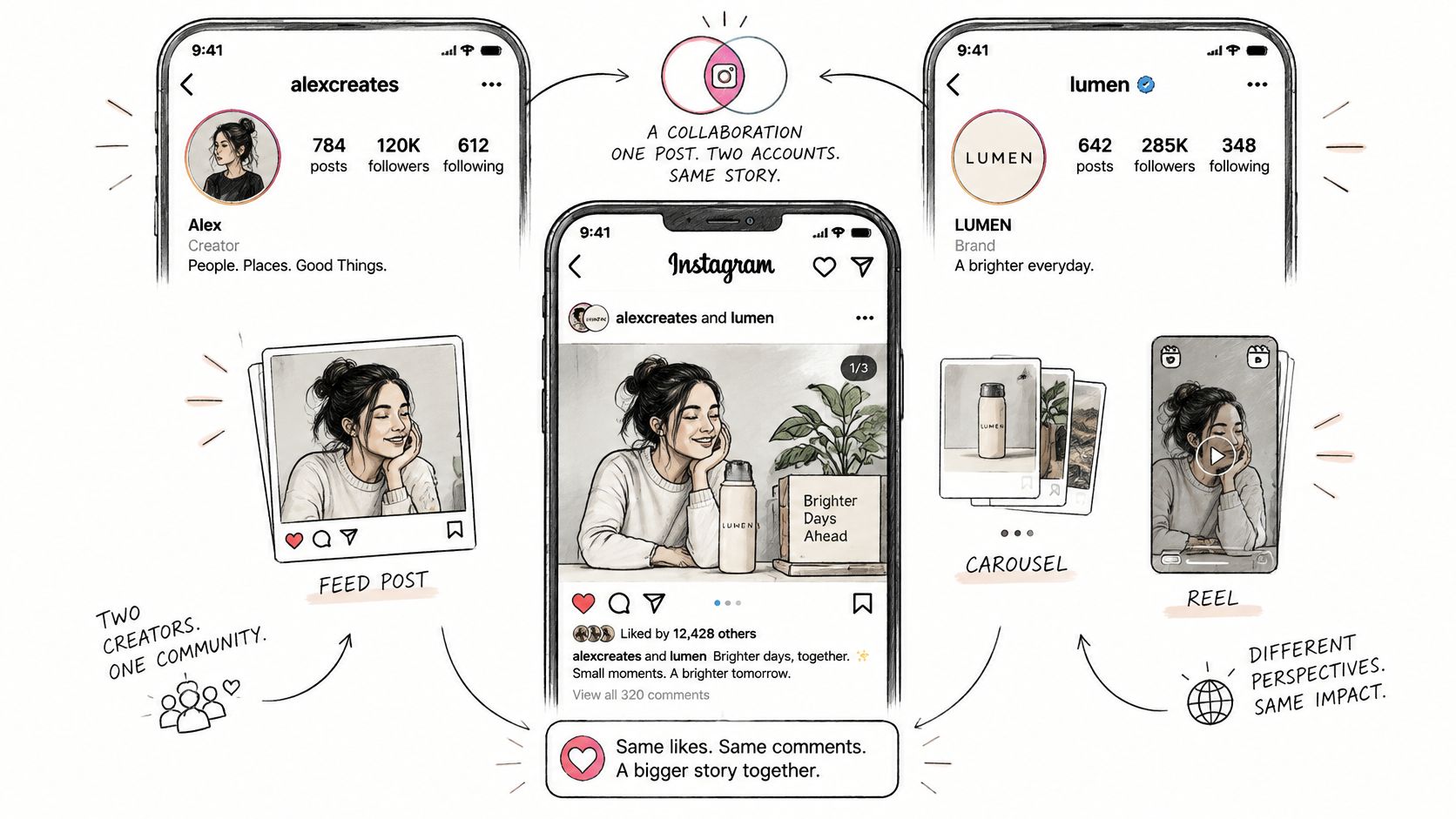
An Instagram Collab post is one post that appears on both the brand's and the creator's accounts. Both names appear at the top, with one shared set of likes and comments.
A creator has prepared a product demonstration, and the brand wants it on its own profile without uploading a duplicate. Before anyone publishes, the team needs to settle who owns the post, how the commercial relationship is disclosed and whether paid distribution is part of the campaign.
What an Instagram Collab Post Is
Say a skincare brand commissions a creator to demonstrate a product. The creator publishes the demonstration and invites the brand to collaborate. Once the brand accepts, the audience can encounter the same content through either profile.
That arrangement keeps the conversation together. The brand doesn't need a separate upload with a separate comment thread. A customer asking about the product contributes to the same discussion that the creator's followers see.
The potential audience is substantial: Ofcom's Online Nation report found that Instagram reached 78% of UK online adults in 2025. That establishes the platform's scale, not the likely performance of a particular creator campaign.
For a launch involving several creators, each partnership can have its own Collab post. The useful distinction is between a shared publishing arrangement and a campaign outcome. A brand name appearing beside a creator's name creates an opportunity for discovery. It doesn't guarantee attention, profile visits or sales.
Practical rule: Treat shared distribution as a publishing choice, not a performance promise.
A Collab also doesn't settle the commercial agreement. The brand still needs appropriate disclosure and written usage rights. Before sending an invitation, the team should distinguish the shared post from the partnership label and any paid advertising permission.
When to Use a Collab, a Label or an Ad
| Option | What the audience gets | When the brand needs it | What it does not do |
|---|---|---|---|
| Instagram Collab post | A shared post on both accounts, with both names and shared engagement. | A launch or creator campaign where the same content belongs on both profiles. | It doesn't replace advertising disclosure or purchase distribution. |
| Paid Partnership label | A visible indication of the commercial relationship. | A commercial creator relationship requiring Instagram's branded-content disclosure. | It doesn't independently place the post on the brand's profile. |
| Meta partnership ad | Creator content distributed through paid advertising. | The brand wants a separately budgeted paid campaign using eligible creator content and permission. | It doesn't establish the organic collaboration or replace clear disclosure. |
These are separate brand decisions, even when the campaign uses them together. The team should confirm current eligibility, permissions and available controls in Instagram's and Meta's own in-app help before booking the deliverable.
A launch needs a publishing decision
A product demonstration may belong on both profiles because customers need to see the product in use. That makes a Collab relevant to the publishing plan.
However, the publishing arrangement doesn't establish whether the content is commercial. A non-commercial collaboration is different from a commissioned endorsement. A Collab alone should only be considered where there's no payment, gift or other benefit and no brand control over the message.
A gifted post needs a disclosure decision
A product supplied to a creator changes the assessment. The brand must consider the benefit provided, its involvement in the content and the applicable advertising requirements.
The Paid Partnership label addresses the commercial relationship. An accepted Collab addresses where the post appears. Neither decision should be left to the publishing assistant after the creative has been approved.
Paid amplification needs a media decision
A brand seeking additional distribution should plan Meta partnership ads separately. The budget, audience, objective and creator permission need their own approval.
The distinction matters commercially. Permission to appear together on an organic post shouldn't be treated as permission to run the creator's identity and content in advertising. The team can use this guide to how Meta partnership ads work with creators when defining that additional scope.
A campaign can need the Collab, the commercial label and the paid ad. Agreeing to one doesn't mean agreeing to the others.
How to Invite a Collaborator on Instagram
The publishing account should be agreed before the invitation is sent. For a creator-led product demonstration, that will often be the creator. For brand-led campaign creative, the brand may be the original publisher.
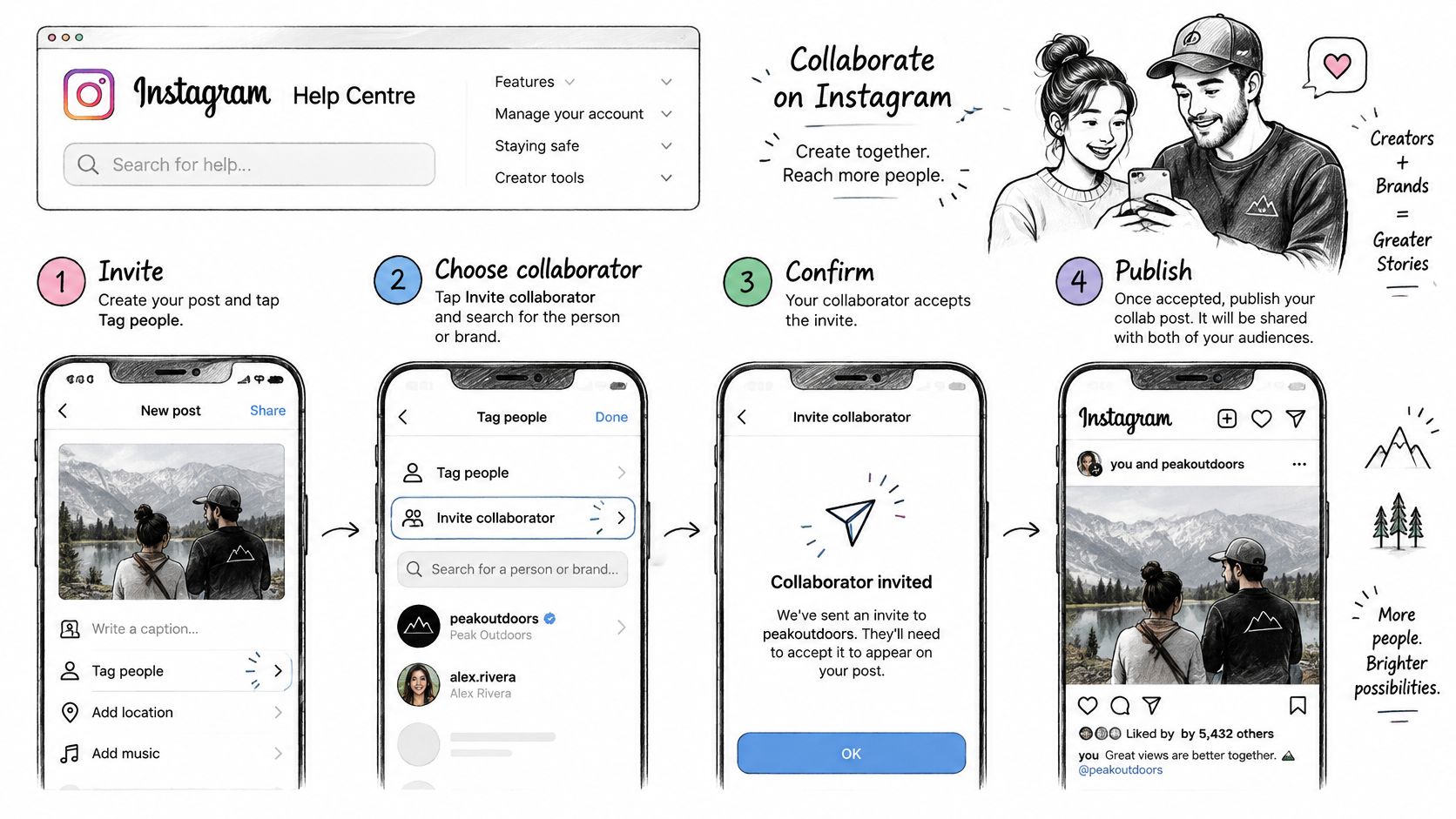
Instagram's Help Centre page on collaborating on reels sets out how the feature works. The account that creates the reel is the primary creator and invites the collaborator. If the invited account accepts, its username is added to the reel, the reel is shared with its followers and it appears on its profile. You can add more than one collaborator. Stories can't have collaborators, only mentions.
The same page lists rules that matter for a brand:
- Only the original creator can delete the reel. If they delete it, it disappears from the collaborator's profile too.
- Either side can end the collaboration. The invited account can remove itself at any time, and the original creator can remove the collaborator. The reel stays on the original creator's profile.
- Privacy settings decide who can be invited. A public account can invite public or private accounts. A private account can invite only accounts that follow it.
- A collab is different from a tag. A tagged photo or video is not shared with the tagged account's followers, and the tagged account is not listed as a creator.
Instagram's interface can change, so check the page again before you schedule a campaign.
Follow the publishing and acceptance sequence
- Confirm the original publisher. Record whether the creator or brand will create the post. That account sends the invitation and keeps control of the post, so its owner must be available at publication.
- Invite before publishing. Instagram's steps: before you publish the reel, tap Tag people, tap Invite collaborators, search for the account and tap it, then tap Done. Check the handle carefully before you go on.
- Publish with the invitation attached. The receiving account must still accept. Sending an invitation isn't the same as completing the deliverable.
- Accept from Messages. The invited account gets a message. Its account manager taps Messages, opens the conversation, taps the collaboration invitation, taps Review to watch the reel, then taps Accept. Accept only after checking the approved content and caption.
- Inspect the live result. Confirm the post appears on both profiles, both names are present and the engagement belongs to the shared post.
Keep acceptance inside the campaign workflow
The brand's social account manager needs a publishing appointment, not just an email saying that content is ready. Otherwise, the creator may publish while nobody with account access is available to accept.
A pending or declined invitation should remain an incomplete delivery status. If the feature is unavailable, the team should investigate before substituting an ordinary tag. A tag isn't the agreed shared publishing arrangement.
The contract should also address removal. Platform controls and contractual obligations are different matters. Either account can leave the collaboration, and the original creator can delete the reel from both profiles, so the agreement should explain when each action is permitted and who must be notified.
What to Agree with the Creator First
Before production starts, agree how the post will be made, disclosed and used. A Collab post, Instagram's Paid Partnership label and a partnership ad are three separate decisions. Agreeing to one does not grant permission for the others.
Put the operating decisions in writing
- Publishing ownership. Name the account creating the post and the person responsible for accepting the invitation.
- Creative scope. Specify the format, visuals, caption and product claims. Identify claims that need evidence or exact wording.
- Disclosure placement. Agree the visible wording and where it must appear, so people can identify the advertising before interacting with it.
- Live period and removal. Set the agreed publication period and the circumstances in which either party may remove the content.
- Advertising permission. State whether the brand may use the content as a partnership ad, and the permitted duration. This permission is separate from accepting a Collab post or displaying a Paid Partnership label.
- Rights and approval. Define usage rights, exclusivity and the person with final approval.
- Tracking. Specify the link or promotional code if visits or sales are campaign outcomes.
Use an influencer brief template to record the creative requirements, disclosure and approval steps before production. Put usage rights, exclusivity, advertising permissions and removal terms in an influencer agreement. A caption approval email alone does not establish those commercial terms. If the creator is paid, settle the fee, the payment terms and the paperwork at the same time, as described in how to pay influencers.
Make disclosure an approval condition
The ASA's 2024 report on ad disclosure on Instagram and TikTok says a post must be obviously identifiable as an ad when the creator gets payment of any kind, including free products or trips, and the brand shares control of the content. The ASA's advice on making ads clear upfront says #ad (or similar) is the clearest way to show this, and the label must be clear upfront in each post.
Instagram's paid partnership label can help identify a commercial relationship. A label that shows only after someone taps "more" is not good enough, the ASA says. Set the wording and placement, then check the live post against that agreement before treating it as approved.
For product brands that want managed execution, Sup's product-brand service sources creators and handles negotiation, contracts, payments and tracking. The client approves every creator and post, and pays for posts only when they go live. A shared post can support distribution, but it does not promise a particular result.
How to Judge Reach and Engagement
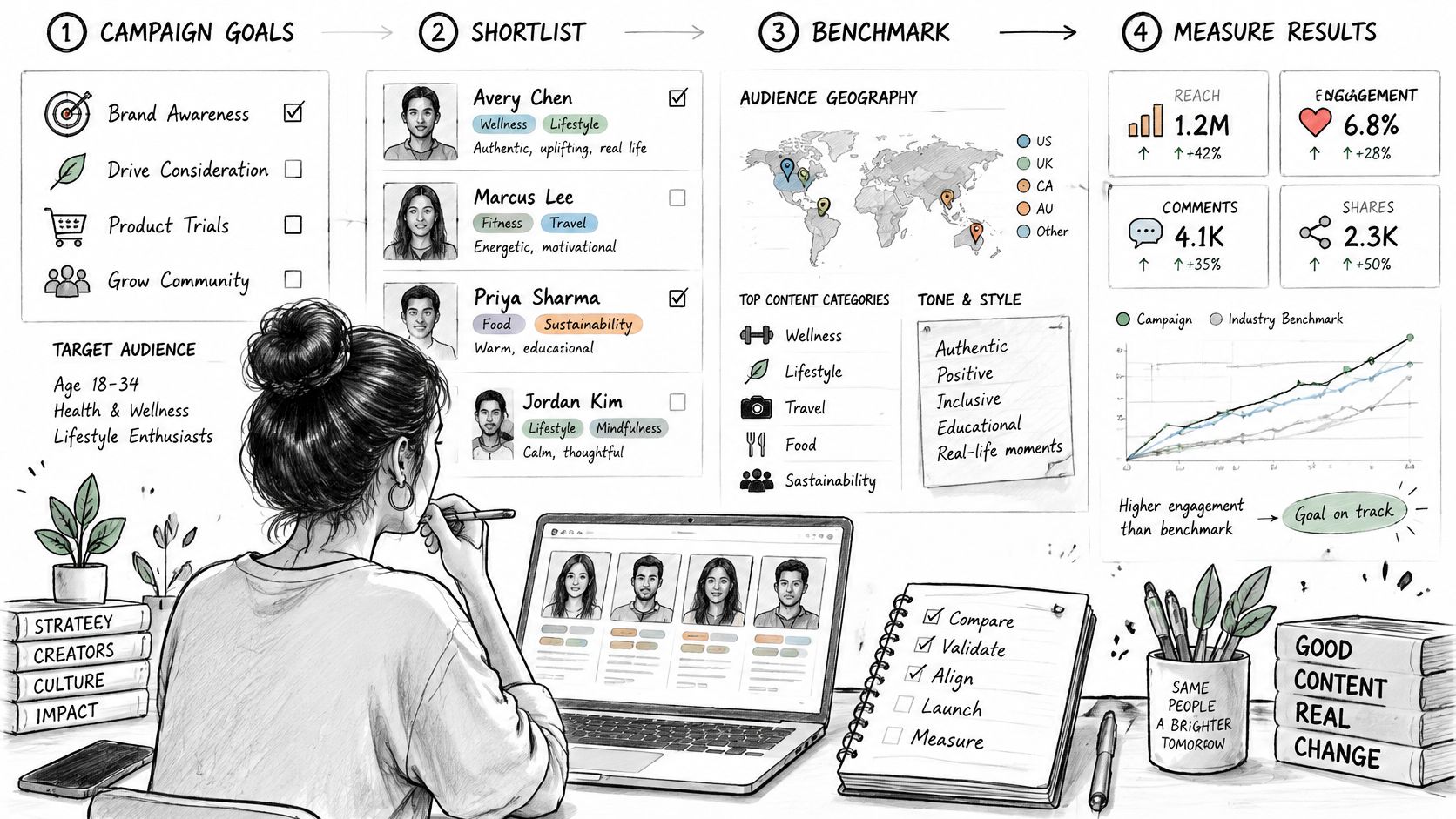
Start with the campaign objective, not follower count. A product demonstration intended to generate qualified visits needs a different assessment from a launch intended to introduce the brand to a relevant audience.
Creator selection should consider recent audience geography, content category and tone. The brand should then compare the proposed deliverable with similar content from that creator, rather than assuming a large following means suitable distribution.
Establish a meaningful baseline
Click Analytic's UK creator economy report reports median engagement of about 0.86% for accounts with 10,000 to 50,000 followers. That's context for a defined account group, not a target every campaign should adopt.
A more useful operational benchmark is the creator's recent median for comparable content. Review Reel views, reach relative to followers, saves and shares. Review Story completion and link activity where those assets form part of the campaign.
Agree a primary conversion measure and an attention measure before publication. Keep the offer, landing page, tracking code and disclosure consistent when testing matched creative. Where feasible, compare the Collab with similar non-collaborative content.
Record the post without counting it twice
Export reach, impressions or views where available, likes, comments, saves, shares and profile visits. Request the available reporting from both account owners, and label the source of each export.
The shared post's totals must not be added together as though each account published a separate asset. Nor should the team assume that all reported reach can be cleanly divided between the brand's followers and the creator's followers.
Measurement discipline: Shared engagement is a post-level result. Account activity and attributed sales need separate reporting.
Use a consistent denominator when calculating engagement rate. An engagement-rate calculator can support the calculation, but it can't choose the right business outcome.
Add clicks, code redemptions or attributed revenue when the brief defined those outcomes. Separate organic results from paid amplification. If repeated creative produces weaker attention or response, examine frequency and audience overlap before commissioning more of the same.
Checks That Still Apply After Publishing
A Collab post going live does not close the review. A creator may later edit its caption or visual, or publish a related Story or Reel. Treat each commercial asset as a separate item to check, and keep a record of what appeared.
The same ASA advice says that disclosing in a post but not in the matching Story or Reel is still against the rules. References in a bio or in past posts are not enough to show that another post is an ad. #affiliate or #aff alone is not likely to be enough. Use the earlier disclosure guidance when reviewing these assets, rather than assuming an approved feed post settles the matter.
Keep a live-asset record
For each published asset, check how it appears to an audience: the first caption line, opening frame and caption preview. If the creator changes a caption or replaces a visual, review the live version again. Approval of a draft does not confirm that later edits remain within the agreed brief.
Save a screenshot and the published URL for the feed post and any supporting Stories or Reels. Archive the version that went live, not only the approved draft. That gives the campaign team a clear record of what was published and what it reviewed.
Give one person ownership
Assign the post-publication check to the campaign manager. Shared responsibility between the creator, account manager and approver can leave everyone assuming someone else has checked. The owner should review edits and supporting assets, then keep the record with the campaign materials.
Check the ASA's current guidance and the campaign details before finalising wording. For a specific case that remains unclear, seek appropriate advice.
Confirm the Brief Before the Next Collab
Before approving the next post, make a go or no-go decision against the campaign's intended outcome and the reporting available from both accounts. Confirm who will assess the result and what evidence they will use. If the measure or any planned asset's disclosure is unresolved, hold publication.
Approve a deliverable the team can operate
Settle three separate decisions: whether the post will use Instagram's Collab feature, whether it requires a Paid Partnership label, and whether the brand will run it as a partnership ad. Agree on the creator's deliverables, the brand's approval points, and any advertising permission before publication. Specify how long that permission lasts before media activity begins.
Use a final go or no-go checklist:
- Publication: Are the post, caption and agreed disclosure approved?
- Rights: Are usage permissions and their duration clear?
- Measurement: Is the intended outcome defined, with reporting access confirmed for both accounts?
- Paid activity: Is the decision to amplify the post recorded, with permission agreed if needed?
The aim is to remove ambiguity from decisions that affect publication, rights and measurement. Clear terms give the creator room to make the content while ensuring the brand knows what it has approved and how it will judge the result. A shared post can support a campaign, but it does not guarantee performance.
To have creator posts like these run for your brand, start a creator campaign with Sup.
More on channels
See how many creators post about you and your competitors
Type in your brand's Instagram handle and we count the creators who post about you and about your five closest competitors. It takes about a minute and it is free. Or request a demo and we will show you the creators in your niche and walk you through the dashboard.
 Book a call