1 October 2026
Visual Content Creation at Scale: A Practical Guide
Monday's production meeting has the familiar shape. Fourteen assets are due, two creators haven't delivered, the brand colours have drifted across drafts, and the paid social team is waiting for cutdowns. Everyone is busy, but nobody has a reliable view of what is ready, what needs approval, and what can legally be used.
That isn't mainly an ideation problem. It's a coordination problem between the brief writer, designer, creator, legal reviewer, social manager and media buyer. Visual content creation works when those handoffs form one operating system, from the first message in a brief to the revenue signal in a dashboard.
The Production Problem Behind Visual Content Creation
Ideas rarely slow production. The blockage comes when a brief, file or approval cannot move cleanly from creator to legal reviewer to media buyer without rework.
A creator films in a flat with natural light. An in-house designer applies a template built for another crop. The paid buyer requests a stronger opening. Legal removes a product claim after the first cut is edited. Each decision may make sense in isolation, yet the asset becomes late, expensive or unusable when those decisions arrive in the wrong order.
The production problem is therefore traceability. Teams need to know which version is approved, where it can run, what rights cover it, and which edits can be made without returning to the creator. For visual content workflows for small teams, simple documentation and clear ownership often matter more than adding another creative tool.
Where the handoffs break
A creator needs room to interpret the message. A brand manager needs consistency. A media buyer needs files that meet placement requirements, while finance needs usage terms and payment records. These requirements can coexist, but only if the handoff defines what each person receives, checks and returns.
The common failure is an incomplete brief. It describes the product and asks for “something engaging”, but leaves out the funnel job, required deliverables, paid usage and approval limits. The creator fills those gaps with personal judgement. The reviewer later treats those choices as errors, and the team pays for a reshoot or late edit.
Practical rule: If someone outside the original meeting cannot execute or approve the asset from the documentation, the brief is unfinished.
Treat the asset as a system input
Ask which source asset can support the campaign across its intended channels, rather than planning one post at a time. That decision changes production before filming begins. A creator video may need a clean opening frame, usable captions, a product close-up and enough variation for organic posts, cutdowns and paid edits.
The asset also needs a planned route through the business. Rights should be recorded before publication. Approval status should travel with the working file. The media buyer should receive versions that fit the placement, while measurement should preserve enough context to connect the creative to commercial outcomes.
A workable process carries the asset from brief to creator delivery, review, repurposed ad creative and revenue reporting. Each stage has a defined owner and a clear acceptance check. That is how teams reduce rework without restricting the creator's judgement.
Writing a Visual Content Brief That Survives Hand Off
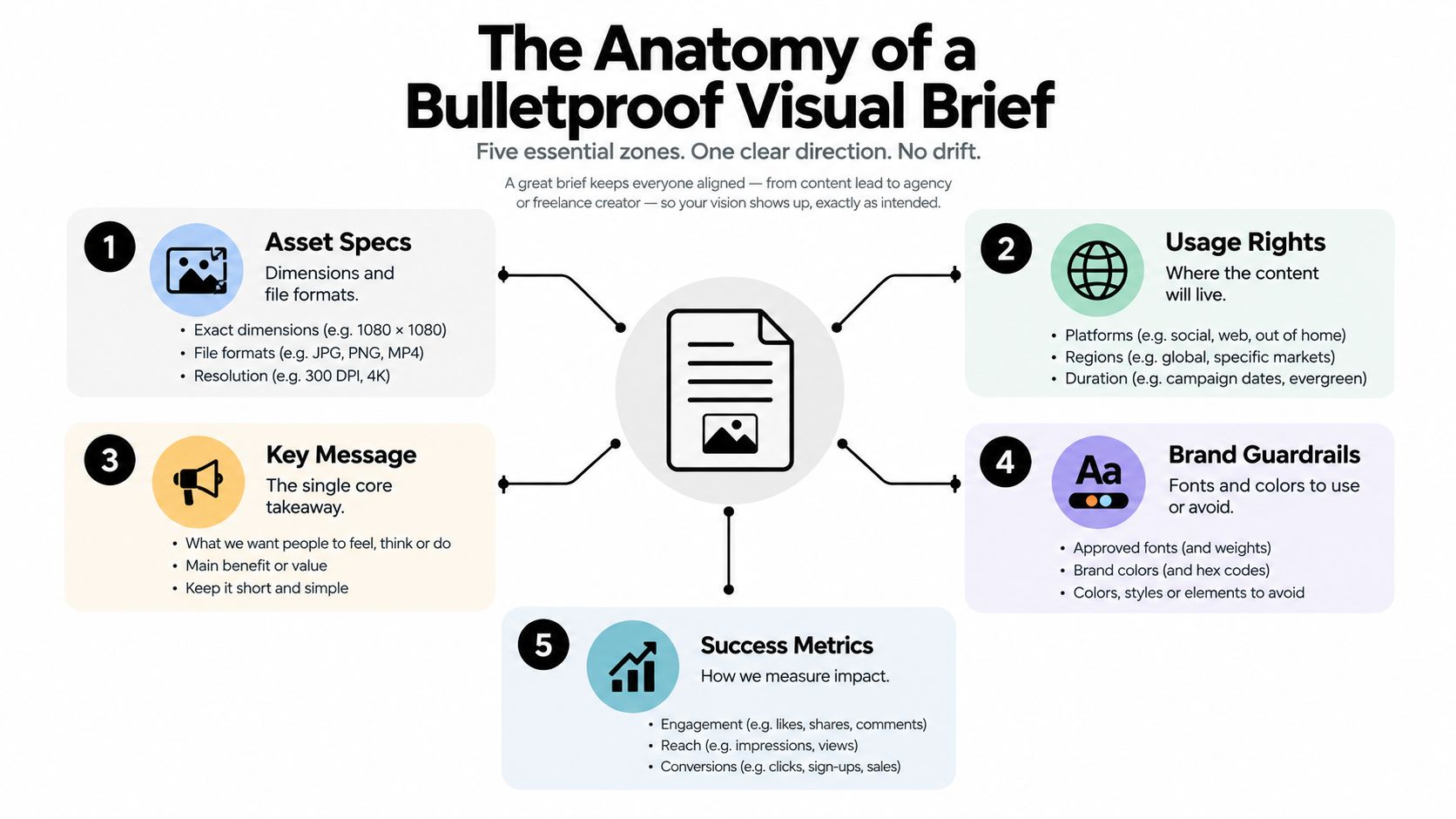
A good brief is short enough to use and specific enough to prevent guesswork. A long document gets skimmed. A one-line request gets reinterpreted. The practical middle is a one-page brief with linked references, supported by a central folder for files, examples and legal notes.
Start with the decision the asset must support
Write the campaign objective in plain language. “Drive consideration for the new range” is more useful than “increase awareness”. Add the funnel stage, the audience cue and the action you want the viewer to take. A creator can then decide whether the opening should demonstrate, compare, explain or invite a response.
The message should fit in one sentence. If the creator needs to choose between three competing claims, the brief is asking for strategy rather than execution. Keep supporting points in a separate section and mark which ones are mandatory.
Separate guardrails from creative choices
Mandatory fields should include:
- Brand elements: Specify logo use, colour tokens, typeface, product naming and a do-not-use list.
- References: Link to a moodboard, approved examples and any relevant product page.
- Deliverables: State the channel, aspect ratio, duration, file format, captions, safe zones and required cutdowns.
- Rights: Define organic use, paid usage, whitelisting or Spark-style activation, territory, duration and edit permissions.
- Process: Give the delivery date, review owner, revision rounds and final publishing route.
The creator can usually flex the setting, pacing, framing and personal delivery. The brand should hold the line on regulated claims, mandatory wording, logo treatment and usage rights. This distinction prevents reviewers from using “on brand” as a reason to rewrite every creative choice.
Make the handoff test explicit
Give the completed brief to someone who wasn't in the planning meeting. Ask them to explain what the creator must say, what the viewer should do, which files are needed and where the asset can run. Any uncertainty belongs in the brief.
For teams building creator programmes, the workflow described in UGC content creation offers a useful reference point for connecting creator output with approval and usage. The brief should also name the file owner and the source of truth. A creator shouldn't receive one logo by email, a different colour value in a shared folder and a third version in a design template.
Choosing the Right Formats for Feeds, Stories and Ads
Format selection should follow the job, not habit. A vertical video may be the right awareness asset because movement and a human voice can establish context quickly. A carousel may be better for consideration because it lets the viewer move through a sequence. A static card can work harder in retargeting when the audience already knows the product and needs a clear reminder.
Short-form video remains the preferred format for 40% of UK consumers, while 35% say they watch more short-form than a year earlier, according to Adobe Express's UK content consumption research. Those figures support testing video, but they don't remove the need for static and sequential formats. The creative job still decides the deliverable.
| Format | Best funnel stage | Strength | Watch out for |
|---|---|---|---|
| Single image | Conversion and retargeting | Clear offer, product or proof point | Can become easy to ignore |
| Carousel | Awareness and consideration | Explains a sequence or comparison | Each panel needs a reason to continue |
| Short vertical video | Awareness | Native movement, voice and demonstration | Weak openings lose attention quickly |
| Longer vertical video | Consideration | Builds context and handles objections | Requires stronger pacing and editing |
| Stories | Consideration and conversion | Supports sequencing, polls and direct action | Each frame must work within the sequence |
| Reels and creator cuts | Awareness and conversion | Feels native and supplies paid cutdowns | Native style can be harder to adapt elsewhere |
| UGC-style video | Consideration and conversion | Brings lived experience and product use | Claims, disclosure and usage need control |
Choose the channel after the job
Instagram, TikTok, LinkedIn and paid placements each have different viewing contexts. A founder explanation may suit LinkedIn, while a product demonstration can travel across vertical video placements. A sequential story can move from problem to proof to action. A carousel can make a comparison legible without asking the viewer to listen.
The trade-off matters. Creator-led video often gives stronger native context but offers fewer clean options for display banners. Static carousels cost less to produce and are easier to resize, but they can fatigue when the same panels appear repeatedly. The production plan should account for that before the shoot.
For a practical look at how product presentation changes paid creative, product visual ad tactics can help teams compare approaches. The working rule is simple: choose the format from the funnel job, then adapt it to the channel. Never start with the aspect ratio and work backwards.
Creative Direction That Protects the Brand Without Killing the Creator
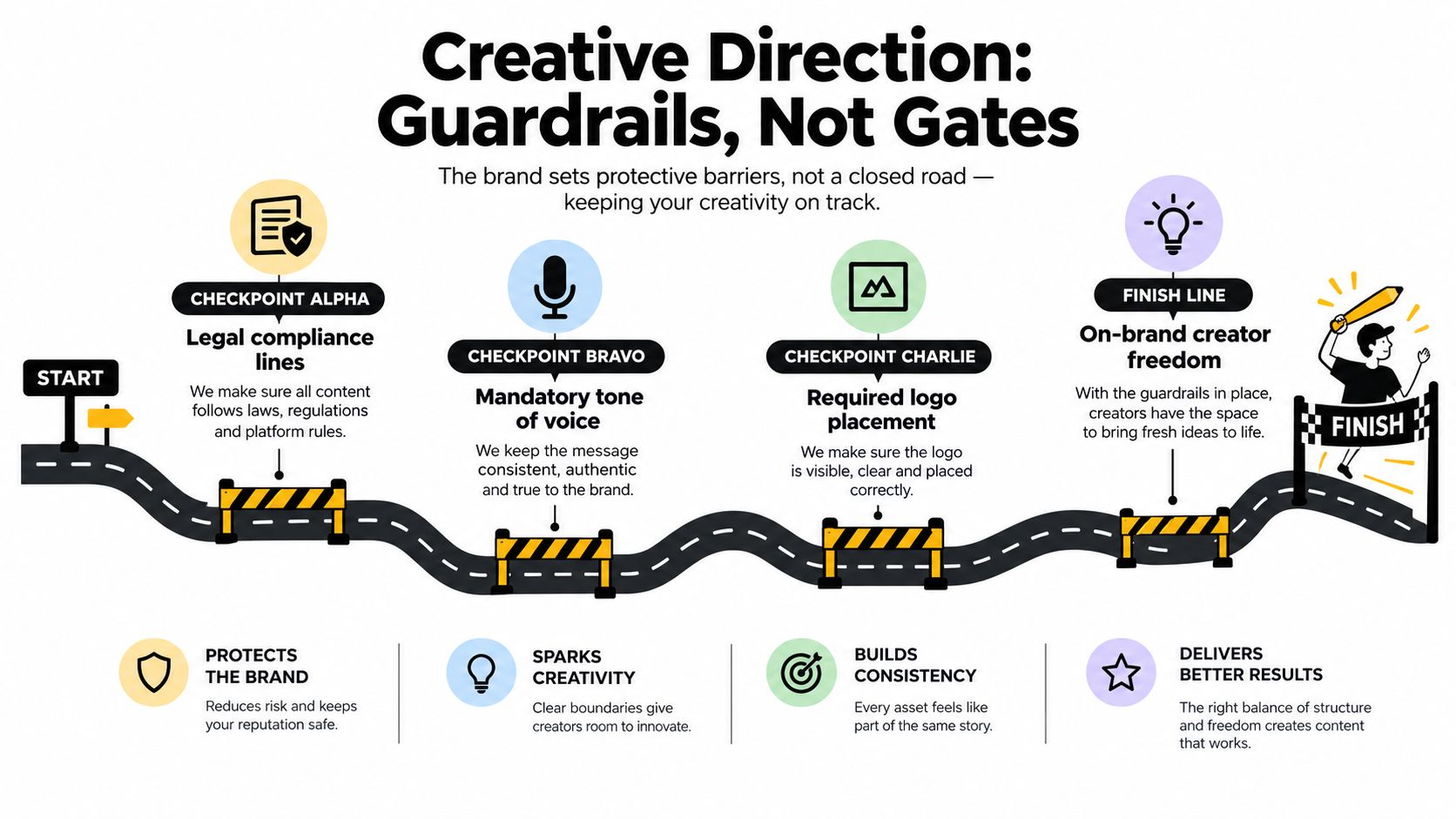
Creative direction should prevent avoidable arguments before filming starts. It isn't a shot list that tells a creator where to stand, how to pause and which expression to make. It is a set of guardrails around a flexible performance.
A useful direction document names the brand must-haves, legal lines, caption tone and visual no-goes. It also states what the creator owns: their setting, natural phrasing, pacing and personal point of view. The approval loop then becomes a quality check rather than a late attempt to take over the work.
Resolve the tension before the shoot
Legal may remove an unsupported claim. Brand may ask for cleaner framing. The creator may resist a polished script that doesn't sound like them. Those positions can coexist if the direction document makes the decision boundaries clear.
Mark comments by type:
- Must change: Remove a claim, correct a product name or add required disclosure.
- Should change: Improve clarity, move the product into frame or strengthen the opening.
- Creator choice: Keep the delivery, setting or transition if the core message remains accurate.
A worked comment might read, “At 00:07, replace the product performance statement with the approved benefit wording. Keep your demonstration and delivery. Add the disclosure in the opening frame and spoken caption.” That is actionable. “Make this more compliant and premium” isn't.
Keep feedback written and finite
Put legal and factual changes in writing. Use a short call for tone or performance questions when written comments could create several interpretations. Send one consolidated list from one owner. Multiple stakeholders commenting independently create contradictions and make the creator guess which instruction wins.
Keep two revision rounds as the default. The first should address compliance, message and obvious production issues. The second should confirm polish and final exports. More rounds may be necessary for complex work, but unlimited feedback trains everyone to treat the first delivery as a rough concept rather than a deliverable.
Creators are more likely to work again when the brand respects their time and voice. Clear guardrails protect both sides. They also make approvals easier across time zones because the creator can act on a single, prioritised record instead of waiting for a meeting.
Tooling and Workflow for Sourcing, Approving and Publishing at Scale
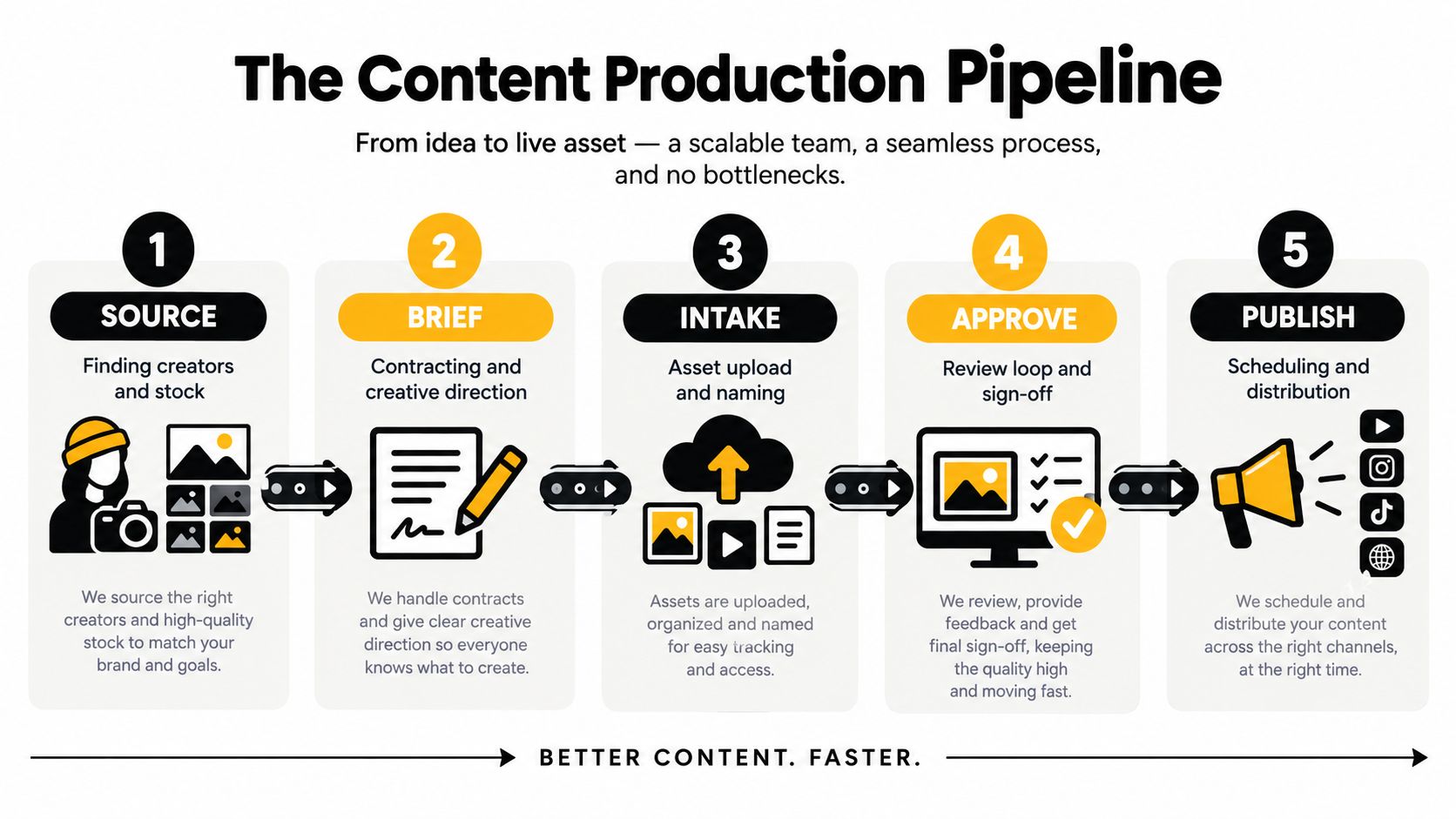
The production stack should follow the movement of the work. Start with sourcing, then move through briefing, intake, approval and publishing. A feature list won't fix a workflow that has no owner at each stage.
Build a linear pipeline
Source: Find creators, stock or existing brand material against the audience, location and creative job. Automate filtering and shortlist alerts where possible. Keep the relationship decision human.
Brief: Issue the brief, contract the creator and record usage rights before production. A project tool can notify owners and track dates. A person still needs to check whether the terms match the intended organic and paid use.
Intake: Require a consistent upload form with creator name, campaign, asset type, version, usage status and delivery date. Automate naming conventions, folder creation and format transcodes. Don't let final files live only in a direct message.
Approve: Route the draft to brand, legal and media owners in a fixed order. Automate reminders and status changes, but keep final brand judgement human. First-pass compliance checks can flag missing disclosures or unsupported wording, yet they shouldn't replace review.
Publish: Send approved files and copy to the scheduler and ad platforms. Record the live URL, spend context, tracking link and rights expiry. A publishing checklist prevents an approved draft from becoming the wrong live version.
Connect the systems without overbuying
A small team can run this with a spreadsheet containing asset ID, creator, campaign, deliverable, status, owner, rights, feedback round and live URL. The spreadsheet becomes useful when every row has one accountable person and a defined next action.
Larger teams may connect a digital asset manager to project management, social scheduling and ad platforms. The important integration is the handoff of metadata. If the media buyer can't see the approved version, rights scope and tracking code in the same record, the system still depends on manual searching.
A managed service such as Sup can handle live creator sourcing, outreach, negotiation, contracts, usage rights, payments, approvals and performance tracking in one campaign workflow. Teams comparing operating models can also review influencer campaign management software before deciding which work belongs in-house.
The human layer remains essential. Keep creator relationships, final creative judgement and crisis response with accountable people. Automate repetition, not responsibility.
Repurposing One Piece of Visual Content Across Organic and Paid
Repurposing starts with rights, not editing. Before a creator records, confirm whether the brand can crop, subtitle, resize, run as paid media, use the creator's handle and edit the footage. A free product, discounted rate or other incentive can create a commercial relationship that needs clear disclosure, as UK government guidance for content creators explains.
Take one approved creator video and create a planned family of assets. The source could become a nine by sixteen reel, a one by one feed post, three to five story frames, two thumbnail options, a fifteen second paid cut and a static retargeting card. Each version should have a distinct job, not just a different crop.
| Source Asset | Organic Variant | Paid Variant | Channel |
|---|---|---|---|
| Creator demonstration | Nine by sixteen reel | Short product-led cut | Instagram, TikTok and paid vertical placements |
| Product stills from the shoot | Feed image or carousel | Static offer card | Instagram, LinkedIn and retargeting |
| Spoken objection handling | Story sequence | Testimonial cut | Stories and paid social |
| Customer reaction | Thumbnail, quote frame or post | Creator-derived conversion edit | Feed and paid placements |
Protect attribution and the creator relationship
Keep the creator credit where the format allows it. Don't remove a handle from a paid edit if the agreement or platform execution requires it. If the brand wants a new territory, longer usage period, whitelisting or substantial editing beyond the original scope, check the contract before exporting.
Tools such as Instagram post automation can support the mechanical work of turning longer footage into platform-ready cuts. They don't decide whether a moment remains accurate, whether the creator still sounds credible or whether the edit meets the rights agreement.
Use a release sequence
A simple fourteen-day window might run like this:
- Days 1 to 3: Publish the hero organic video and a supporting feed frame.
- Days 4 to 6: Use story cuts to answer an objection or highlight a product detail.
- Days 7 to 10: Test the first paid edit and a different thumbnail.
- Days 11 to 14: Retarget engaged viewers with the static card or proof-led cut.
The sequence should feel like a campaign, not the same post repeated. For teams building this process, repurposing influencer content for paid social ads provides a useful reference for connecting source assets, edits and paid usage.
Metrics That Prove Your Visual Content Is Actually Working
Likes, saves and reach help describe attention. They don't justify continued investment on their own. A strong visual content creation system measures three layers: audience response, operational health and commercial outcome.
At the operational layer, track approval turnaround, brief revision count, on-brand delivery rate and creator output per cycle. These measures show whether the team can produce usable work repeatedly. A campaign with strong reach but slow approvals may be consuming more resource than its media results justify.
At the commercial layer, connect assets to assisted conversions, branded search, footfall, promo code redemptions and incremental return on ad spend. The exact signal depends on the business. A local restaurant needs a different proof point from an ecommerce brand selling through a tracked checkout.
| Stage | Metric | Why It Matters | Target Signal |
|---|---|---|---|
| Attention | Reach, views and saves | Shows whether the asset earns initial response | Relevant audience engages with the intended message |
| Production | Approval turnaround | Reveals workflow friction | Reviews happen within the campaign window |
| Quality | On-brand delivery rate | Tracks whether the brief survives execution | Fewer avoidable revisions |
| Distribution | Assisted conversions | Captures influence beyond the last click | Organic and paid assets support journeys |
| Local action | Footfall or promo code redemptions | Connects creative to physical or tracked action | Asset-linked activity appears in the intended location |
| Paid performance | Incremental return on ad spend | Tests creator-derived variants against paid investment | The variant adds value beyond existing demand |
Follow one asset through the journey
Suppose a creator video publishes organically, then appears in an email and later runs as a paid cut. Tag the organic post, use a tracked email link, assign a distinct paid creative ID and keep the promo code tied to that asset. The dashboard can then separate attention from clicks, assisted action and direct conversion.
A branded search increase after the post may indicate demand creation, but it doesn't prove that the video caused every later search. Treat it as supporting evidence. A redemption tied to the asset's code is more direct, while incremental paid performance requires a controlled comparison rather than a favourable result in isolation.
The UK creator economy is also becoming more commercially significant. Creator revenue is projected to exceed £1.217 billion in 2026 after 20% growth in 2025, according to Marketing Week's report on UK creator revenue. That projection makes measurement discipline more important, not less. As budgets move from experiments into repeatable programmes, teams need to know which creative inputs create revenue and which only create activity.
Sup connects live creator sourcing, briefing, approvals, usage rights, payments and tracked campaign reporting for brands running visual content programmes. Visit Sup to see how the managed workflow fits your team, or book a call to discuss a measurable creator campaign.
More on content & ugc
See how many creators post about you and your competitors
Type in your brand's Instagram handle and we count the creators who post about you and about your five closest competitors. It takes about a minute and it is free. Or request a demo and we will show you the creators in your niche and walk you through the dashboard.
 Book a call