22 April 2026
User Generated Video: The Guide to Scalable ROI in 2026
86% of brands use user-generated content in marketing, and 92% of users trust it more than other content forms according to Kasra Design’s UGC and video statistics roundup. That should settle the argument about whether user generated video matters.
What it doesn’t settle is the part that frustrates most marketing teams. Getting a few decent clips is easy. Turning user generated video into a channel that reliably produces sales, bookings, repeatable creative, and clear attribution is much harder.
That gap is where most programmes stall. The content exists, but the workflow is messy. Legal approval happens late. Codes aren’t unique. Files live in random folders. The social team likes the videos, but the performance team can’t prove what moved revenue. For ecommerce brands, that means content gets posted but not operationalised. For restaurants and multi-location brands, it means a spike in views with no clean link to covers, bookings, or footfall.
User generated video works best when you stop treating it like a creative side project and start treating it like an acquisition system. That means tighter briefs, structured rights, proper tracking, a usable content library, and a decision-making loop based on outcomes rather than applause.
The Unstoppable Rise of User Generated Video
Short-form video now sits at the centre of buyer research, not at the edge of it. Analysts at Fortune Business Insights’ UGC platform overview point to a market shaped by massive video consumption, platform maturity, and broad business adoption of video as a core marketing format.
That shift changes how brands earn action. Buyers still notice polished brand assets, but they often make their decision after watching someone use the product in a normal setting, show the hotel room from the doorway, film the meal at the table, or explain in plain language why they bought again. For e-commerce, hospitality, and multi-location brands, that kind of footage acts as commercial evidence. It reduces uncertainty at the point where people hesitate.
Attention follows the format people already consume all day.
The mistake is treating that attention as the win. Views, saves, and comments can help diagnose creative strength, but they do not tell a growth team whether user generated video is producing revenue, bookings, or store visits. I have seen brands collect hundreds of usable clips and still fail to build a channel because no one decided which videos were meant to prospect, which were meant to convert, and which were meant to support retention.
Brand-made video still matters. It gives teams control over claims, visual standards, and campaign timing. User generated video fills a different role. It supplies texture, credibility, and context that polished production often misses, especially in paid social, product pages, local discovery, and remarketing.
The rise of user generated video matters because it forces a more disciplined operating model. Teams need to decide early where the footage will run, what proof it needs to contain, who owns usage rights, and what outcome each asset is expected to influence.
A useful system answers three questions before production starts:
- Which business result matters most: Sales, bookings, leads, repeat visits, or footfall.
- Which video format is built for that result: Testimonial, demo, unboxing, room tour, before-and-after, or creator explainer.
- Which tracking method will prove impact: Unique codes, UTMs, post-view lift, booking source fields, or location-level sales comparisons.
Without that structure, user generated video stays stuck as a creative tactic. With it, it becomes a repeatable acquisition and conversion input that performance teams can test, legal teams can approve, and operators can scale.
What Exactly Is User Generated Video
User generated video is brand-relevant video made by customers, creators, guests, or advocates rather than by the brand’s in-house production team. Sometimes it’s organic. Sometimes it’s commissioned. What matters is the viewing experience. It feels like peer communication, not corporate broadcasting.
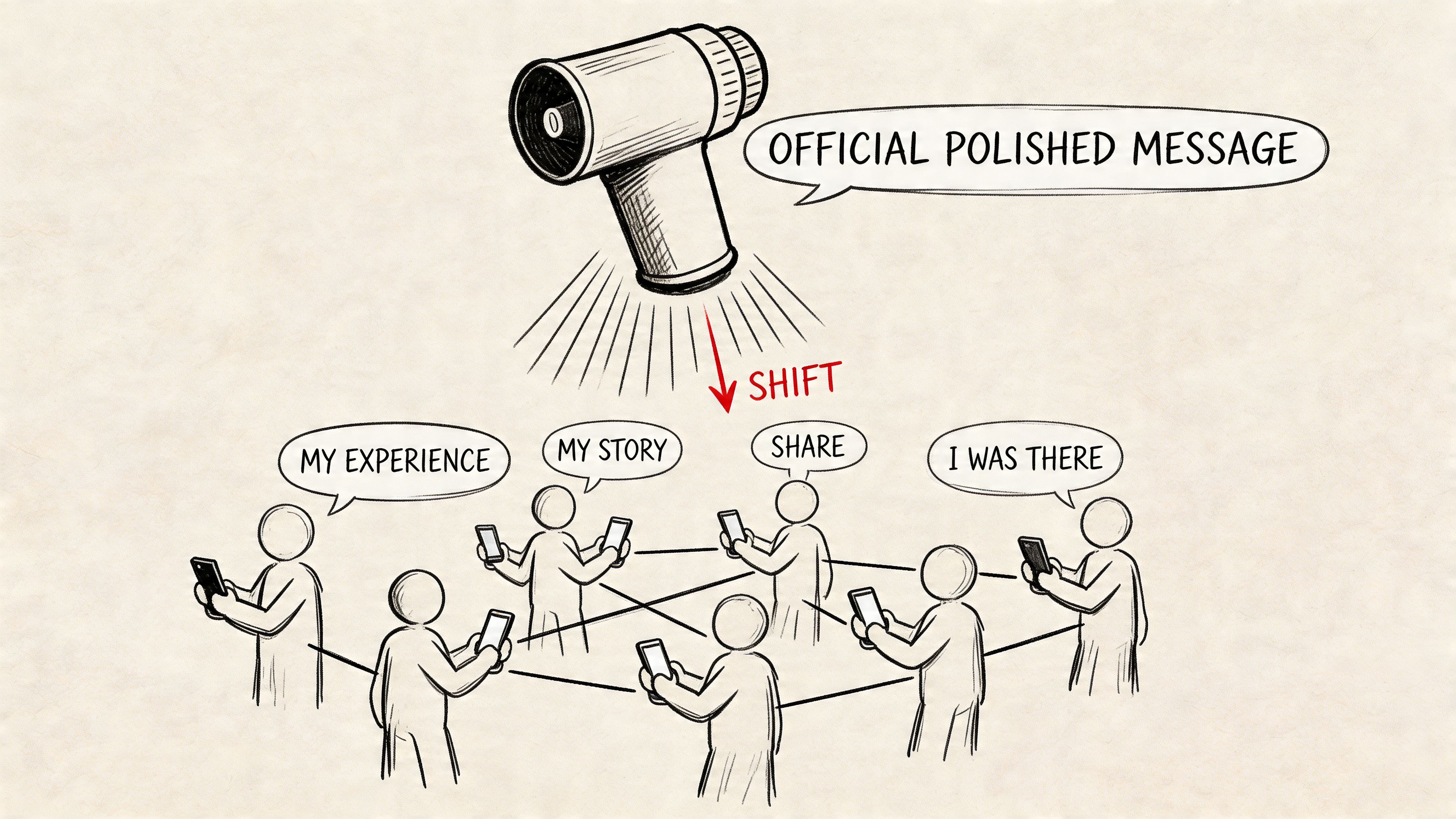
The easiest way to explain it is this. Traditional advertising is a speech from a stage. User generated video is a conversation across the table. One format tells people what to believe. The other shows them how someone else experienced the product or venue in normal life.
From early social clips to a core marketing format
The format didn’t start as a polished system. It grew out of people posting short, informal clips because that’s how social platforms trained behaviour. According to Fortune Business Insights’ UGC platform overview, YouTube has over 2.7 billion monthly users in 2025, TikTok’s global launch in 2018 accelerated the short-form shift, and 89% of businesses include video in their strategies.
That matters because user generated video isn’t a niche content type sitting beside your strategy. It has become one of the main ways video strategy gets executed.
What counts and what doesn’t
A useful distinction is between format and function.
Common examples that count as user generated video:
- Product demos from creators: Someone shows how they apply, wear, assemble, or use the product.
- Customer reviews on camera: A buyer explains what they liked, what they didn’t, and who it suits.
- Hospitality walkthroughs: A local creator films the space, the food, the service flow, or the atmosphere.
- Routine-based clips: Skincare, fashion, fitness, food, and home products often perform well when shown in context.
What usually doesn’t work well:
- Over-scripted fake reactions: If it sounds like ad copy, viewers notice.
- Generic praise with no specifics: “Love this product” doesn’t answer a buyer’s question.
- Clips with no usage rights sorted: Even strong content loses value if the legal side blocks reuse.
The best user generated video doesn’t try to imitate studio production. It removes uncertainty for the next buyer.
That’s the strategic value. User generated video is digital word-of-mouth captured in a format your brand can distribute, test, and reuse.
The Business Case for Investing in UGV
The strongest reason to invest in user generated video is simple. It moves people closer to purchase when deployed in the right place.
Firework’s guide to video UGC cites case study results showing conversion rate lifts between 9.9% and 21.4%. That’s the part many teams underestimate. User generated video isn’t just top-of-funnel content for awareness. It’s often most valuable near decision points, where a buyer needs reassurance before clicking buy, booking a table, or redeeming an offer.
Why it converts when polished creative doesn’t
Studio content is good at controlled storytelling. User generated video is good at reducing hesitation.
A strong product page video review does a few things at once. It shows scale, texture, fit, speed, sound, packaging, or application in a way static imagery often can’t. It also gives the buyer a reference point that feels less curated. For hospitality, a creator video can answer the core question behind the booking decision, which is usually some variation of “what’s it like when I get there?”
Here’s where it tends to work best:
| Placement | Job of the video | Why it matters |
|---|---|---|
| Product pages | Remove objections | Buyers can see real-world use before purchase |
| Paid social | Stop the scroll with believable proof | Feels native to the feed |
| Retargeting | Reinforce trust | Helps close hesitant visitors |
| Landing pages for local offers | Show experience quickly | Useful for restaurants, salons, gyms, and venues |
| Post-purchase flows | Prompt advocacy and education | Turns customers into a content source |
Cost isn’t the only efficiency gain
Teams often frame user generated video as a cheaper alternative to full production. That can be true, but the more important efficiency gain is creative throughput.
You can generate more variations, test different hooks, refresh ads more often, and tailor content by audience or location without rebuilding every campaign from scratch. For multi-location brands, that’s a major advantage. One polished national campaign can’t always speak to local context. User generated video can.
Operational reality: The ROI comes from reuse as much as creation. One strong clip can live on a product page, in paid social, in email, and in your content library for later edits.
The business case gets stronger when you treat user generated video as modular performance creative. Not every clip needs to be perfect. It needs to be specific, usable, rights-cleared, and tied to a commercial goal.
Putting User Generated Video to Work
User generated video becomes valuable when each format solves a clear business problem. The easiest way to plan it is by vertical, then by customer journey stage.
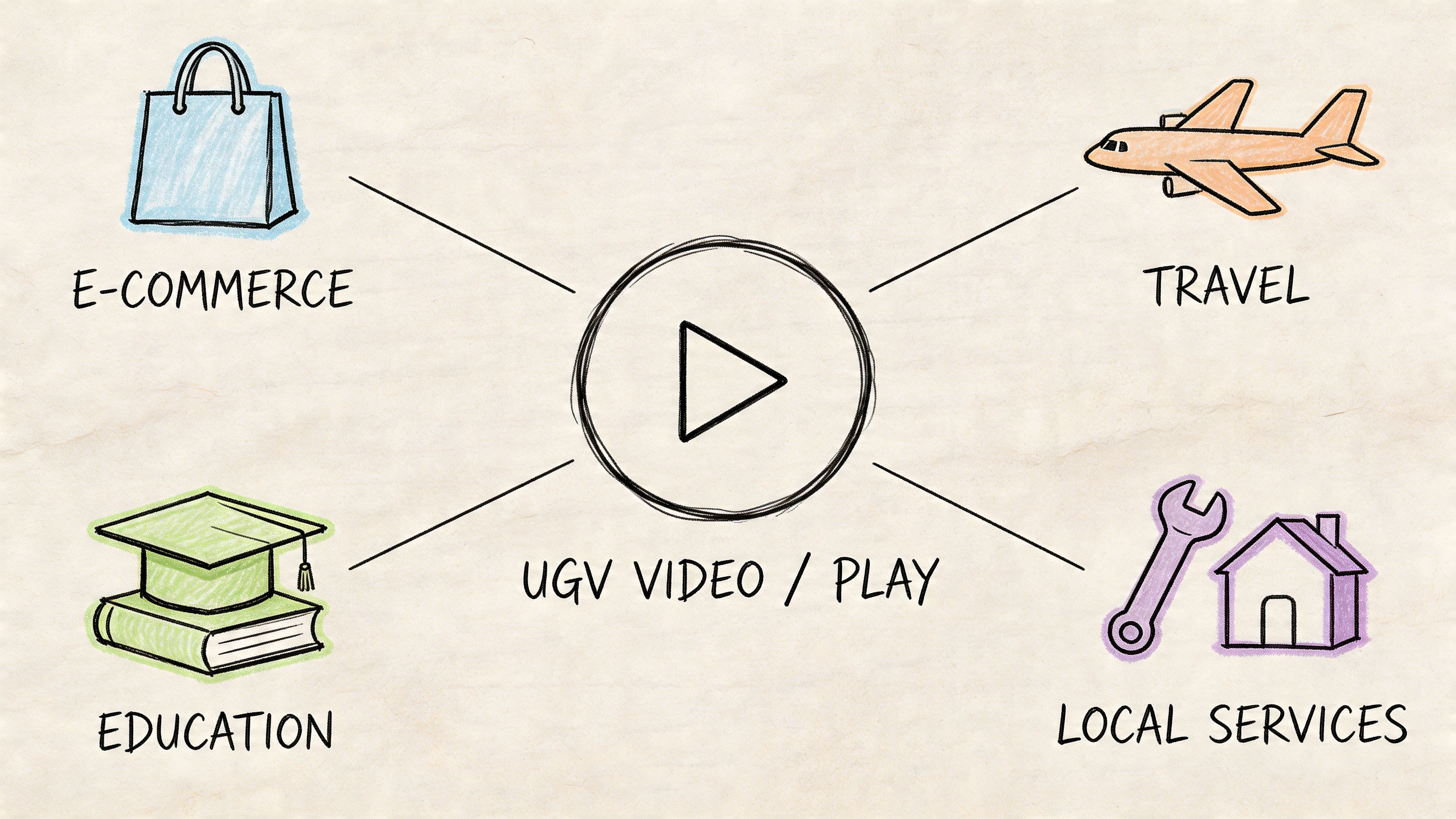
Ecommerce and DTC brands
For ecommerce, the best-performing user generated video usually answers objections the product page hasn’t settled yet.
An unboxing works when packaging, first impression, or quality reassurance matters. A tutorial works when the product needs demonstration. A styling video works when fit, pairing, or real-life context influences the sale. If you’re mapping campaign ideas, these UGC use cases are a helpful reference because they show how one format can be adapted for different commercial goals.
A few practical matches:
- Unboxings for hesitation at checkout: Useful when buyers want confirmation on presentation, finish, or quality.
- How-to clips for products with friction: Better than generic testimonials when the sale depends on understanding usage.
- Comparison-style reviews: Strong for products where “who is this for?” matters more than broad awareness.
If you want a more conversion-focused angle on briefing and placement, this guide to UGC for ecommerce that converts is worth reviewing before you launch creator asks.
Restaurants, cafés, and hospitality venues
Hospitality brands often misuse creator content by asking for a pretty video instead of a decision-driving one.
A useful restaurant clip usually captures three things. What the venue feels like, what the ordering experience looks like, and which item is worth coming in for. The best local creators do this naturally. They don’t just show food. They give viewers a reason to visit on a specific occasion, such as lunch with colleagues, a date night, or a quick stop before an event.
Formats that tend to hold up:
- Dish-first reviews: Good for signature menu items and seasonal launches.
- Visit vlogs: Better when ambience and service are part of the sale.
- Neighbourhood-led clips: Strong when the creator’s local relevance matters as much as the venue itself.
Multi-location brands and franchises
Chains need consistency, but they also need local credibility. That’s where user generated video can outperform centrally produced creative.
A creator in Manchester talking about a local branch reaches differently from a generic national ad. The same applies to gyms, clinics, cafés, beauty chains, and retail stores. The message can stay on brand while the proof becomes local.
What doesn’t work is forcing every location into the same script. What does work is a repeatable framework with local variation. Same offer structure, same CTA logic, same tracking method. Different faces, settings, and neighbourhood relevance.
Navigating Creative and Legal Guidelines
Most user generated video problems don’t start in editing. They start in briefing and permissions.
The UK compliance side deserves more attention than it gets. According to GetStream’s UGC examples article, a 2025 ASA report found 78% of influencer videos failed to clearly disclose paid partnerships, leading to £1.2 million in fines. For any brand paying creators, gifting products in exchange for content, or amplifying creator posts, that’s not background admin. It’s campaign risk.
The legal checklist that should exist before filming
A lot of teams wait until content arrives to think about usage. That’s backwards. Rights, disclosure, and approval rules should be agreed before a creator records anything.
Use a simple checklist:
- Disclosure terms: State how paid or incentivised content must be labelled.
- Usage rights: Define where the brand can reuse the video, for how long, and in what formats.
- Editing permissions: Clarify whether you can crop, subtitle, trim, or combine clips into ads.
- Exclusivity boundaries: If relevant, set rules on competing brands in the same category.
- Approval process: Decide whether the creator posts first, the brand approves first, or both.
For teams that need a cleaner process around permissions and reuse, this guide on getting influencer content rights for marketing lays out the practical parts you don’t want to sort by email after the content has gone live.
If you can’t explain your rights position in one paragraph, your team probably doesn’t have a usable rights process.
Creative control without killing authenticity
The common mistake is swinging to one of two extremes. Either the brief is so loose that the content comes back vague and unusable, or it’s so rigid that the creator sounds like they’re reading ad copy.
The fix is structured prompting. Instead of “say what you think”, ask for specific proof. If it’s skincare, ask about texture, wear with make-up, or how it fits into an existing routine. If it’s apparel, ask about shoulder fit, fabric feel, or how it compares with usual sizing. If it’s a restaurant, ask what the arrival experience felt like, what they ordered, and who they’d recommend it to.
That structure does two things. It improves the quality of the testimonial, and it creates more useful metadata when you catalogue content later.
What strong briefs usually include
A usable creator brief should cover:
- The scenario: Why this video exists and where it will be used.
- The audience problem: What uncertainty the video needs to remove.
- Mandatory proof points: Product details, service moments, or offer details that must appear naturally.
- Creative guardrails: Tone, exclusions, brand sensitivities, and disclosure requirements.
- Submission standards: File format, clip length range, orientation, and deadlines.
The best creator videos still feel personal. They just aren’t random.
How to Build a Scalable UGV Workflow
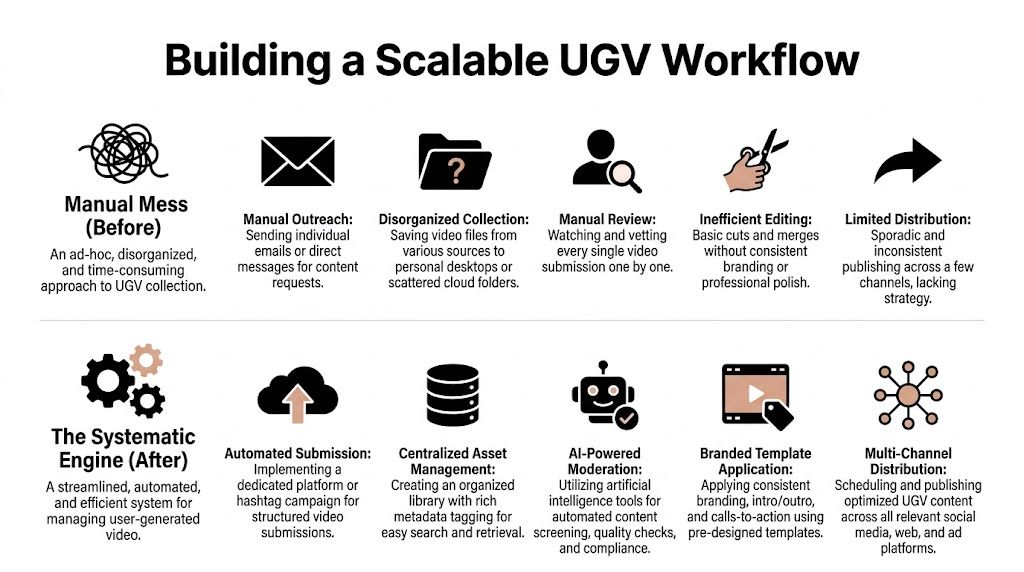
Ad-hoc user generated video collection usually looks the same. Someone finds creators manually. Outreach happens in DMs and email threads. A spreadsheet tracks status until it doesn’t. Files arrive through links, inboxes, and chat apps. Codes are copied by hand. Nobody is sure which video is rights-cleared, which one performed, or where the final edit lives.
That system can work for a handful of creators. It breaks when you need consistency.
What the manual process gets wrong
Manual processes create three recurring bottlenecks:
| Bottleneck | What happens in practice | Business impact |
|---|---|---|
| Creator management | Outreach and follow-ups happen one by one | Slow campaign launch and dropped replies |
| Asset handling | Files are scattered across drives and chats | Good content gets lost or reused poorly |
| Attribution setup | Codes and links aren’t standardised | Reporting becomes unreliable |
Teams often assume the problem is creator quality. Usually it’s workflow design.
The workflow that scales
A scalable system is less glamorous than the creative itself. It’s mostly process discipline. But that discipline is what lets user generated video become a repeatable growth channel.
The core stages should look like this:
- Source creators against a clear brief Match by niche, audience fit, location, and content style. For hospitality and local brands, geography matters more than follower count in many campaigns.
- Standardise outreach and acceptance Use repeatable messaging, clear deliverables, and known turnaround expectations. If every creator gets a different explanation, quality drifts fast.
- Assign unique tracking before content goes live Every creator should have their own code, link, or booking reference where possible.
- Collect submissions in one place Not inboxes. Not personal drives. A central system with status tracking, usage notes, and campaign tags.
- Review for both quality and compliance Creative review should check clarity, proof points, brand fit, and disclosures. Legal review should check rights and posting conditions.
- Store with metadata for reuse Tag by product, location, creator, format, hook, audience, and outcome. That’s what makes your library usable later.
- Redistribute across channels Good user generated video shouldn’t die on the creator’s profile. Recut it for ads, product pages, emails, landing pages, and sales collateral where relevant.
Strong workflows don’t just help you launch campaigns faster. They help you learn faster.
Platform support versus patchwork tools
You can build parts of this with general tools such as Airtable, Notion, Google Drive, and your ad platform dashboards. Plenty of teams do. The trade-off is coordination overhead. You end up stitching together outreach, approvals, tracking, payments, asset storage, and reporting across multiple systems.
A dedicated platform can reduce that fragmentation. For example, Sup’s creator content library workflow guide is useful if you’re trying to move from campaign-by-campaign collection to a reusable asset system. In practice, platforms in this category centralise creator sourcing, communication, tracking links, code attribution, and content storage so teams spend less time on admin and more time on placement and optimisation.
That’s the significant shift. You stop “getting some UGC” and start running a content operation.
Measuring Real-World Impact and ROI
If your reporting stops at views, likes, and comments, you don’t have a performance channel. You have a content activity.
The ROI question is where user generated video programmes either mature or stall. This is especially obvious for restaurants, cafés, clinics, and retail chains where the commercial action often happens offline. According to Level Agency’s analysis of UGC and vertical video trends, UGV drives 35% of restaurant bookings via promo codes in UK Statista data, yet only 22% of campaigns effectively track offline conversions in a British Retail Consortium study.

What to measure instead of vanity metrics
Views still matter, but only as directional context. The numbers that help you make budget decisions are the ones tied to action.
Track metrics like:
- Code redemptions: Useful for ecommerce, hospitality offers, and local campaigns.
- UTM-driven sessions and conversions: Essential for online attribution and landing page analysis.
- Booking completions: Especially relevant for restaurants, events, salons, and venues.
- Product page engagement after video exposure: Helpful when testing placement impact.
- Revenue by creator or content format: Lets you decide who and what to scale.
A practical attribution model
For online brands, the cleanest model is usually a mix of unique promo codes and UTM-tagged links. That gives you direct conversion data plus traffic source context.
For multi-location businesses, you need one more layer. Connect the code or booking reference to a location and creator. Otherwise, you’ll know that the campaign worked somewhere, but not which local collaboration drove the outcome.
A simple structure looks like this:
| Element | Purpose | Example use |
|---|---|---|
| Unique promo code | Track redemptions by creator | Discount, free add-on, booking perk |
| UTM link | Track click path and web conversion | Paid amplification, bio links, stories |
| Location tag | Tie activity to a branch or venue | Franchise and chain reporting |
| Asset ID | Match performance to a specific video | Creative testing and reuse decisions |
Don’t ask “did UGV work?” Ask “which creator, in which format, for which location, drove the action we care about?”
That framing changes how you budget. It also changes how you brief. Once you know that walkthroughs drive bookings better than dish close-ups, or that tutorial-style product videos convert better than aesthetic edits, your next campaign gets sharper.
There’s also a strategic difference between creator ROI and platform monetisation. If your team is benchmarking creator economics against channel-level video value, this explainer on understanding YouTube monetization is useful for separating creator earnings logic from brand-side acquisition logic.
The end goal is straightforward. Every video should have a business job, a tracking method, and a next action if it performs. That’s how user generated video earns a permanent line in the budget instead of being treated as an experimental extra.
If you want to operationalise user generated video without managing outreach, approvals, codes, and reporting in separate tools, Sup gives teams a done-with-you way to run creator campaigns with structured workflows, attribution, and a reusable content library.
More on content & ugc
See how many creators post about you and your competitors
Type in your brand's Instagram handle and we count the creators who post about you and about your five closest competitors. It takes about a minute and it is free. Or request a demo and we will show you the creators in your niche and walk you through the dashboard.
 Book a call