1 May 2026
How to Calculate CPM for Ad Campaign Success
You’ve closed the campaign, pulled the screenshots, exported the platform reports, and now someone asks the awkward question: what did that reach cost us? If you’re running paid social, display, or influencer campaigns, that question usually leads straight to CPM.
If you only need the number, our free CPM calculator works it out from any two of cost, impressions and CPM, and ranks creators by cost per 1,000 views.
The trouble is that most advice on how to calculate CPM assumes neat ad platform data. Influencer campaigns aren’t neat. Costs sit across creator fees, gifted product, usage rights, and internal handling. Impressions come from TikTok views, Instagram Story opens, Reel plays, whitelisted ads, and sometimes a Google Sheet full of creator screenshots. The maths is simple. The inputs rarely are.
That’s why CPM still matters. It gives you a common language for reach. Used properly, it helps you compare channels, spot expensive inventory, and decide whether a campaign bought attention efficiently. Used badly, it turns into a vanity metric that flatters weak campaigns and punishes strong niche ones.
Demystifying Your Campaign Costs
You often encounter CPM after a campaign has already gone live. You have spend. You have impressions. You need a number that turns those two things into something comparable across Meta, TikTok, display, YouTube, and creator partnerships.
CPM means cost per mille, or the cost to generate 1,000 impressions. In plain English, it answers this question: how much did you pay to put the campaign in front of people one thousand times?

That makes CPM a reach-efficiency metric, not a profitability metric. It doesn’t tell you whether people clicked, bought, booked, or came back later. It tells you what visibility cost. That’s useful because every channel, even highly performance-driven ones, starts with exposure.
What CPM is good for
CPM is most useful when you need to:
- Compare media costs across channels so a paid social campaign and an influencer campaign can sit on the same scorecard
- Pressure-test platform pricing when one audience, placement, or creator looks unexpectedly expensive
- Separate reach from conversion performance so you can see whether the problem sits in media buying or in the offer, landing page, or creative
If you also need to tie awareness spend to downstream action, pair CPM with conversion metrics. For lead generation teams, this guide on how to calculate cost per lead is useful because it shows the next step after reach: what those impressions produced.
Why influencer campaigns make CPM messy
Display platforms hand you impression counts. Influencer campaigns often don’t. You may need to collect Story views from creators, confirm whether a TikTok “view” is the same kind of exposure you’re counting elsewhere, and decide whether to include product seeding, shipping, or content editing in total cost.
That’s where teams get stuck. They know the formula, but they don’t know what belongs in it. If you’re trying to connect CPM to actual acquisition cost in creator work, this breakdown of the true cost per acquisition from influencer helps frame the broader measurement problem.
CPM is the price of attention. It’s not the price of outcome.
Once you understand that distinction, how to calculate CPM becomes much more useful. You stop asking it to do every job, and start using it for the one job it does well.
The Core CPM Formula and Its Variations
A CPM calculation only works if the inputs are clean. The maths is simple. The judgment sits in what you count as cost and what you accept as an impression.
The CPM formula explained
CPM = (Total Campaign Cost / Total Impressions) × 1000
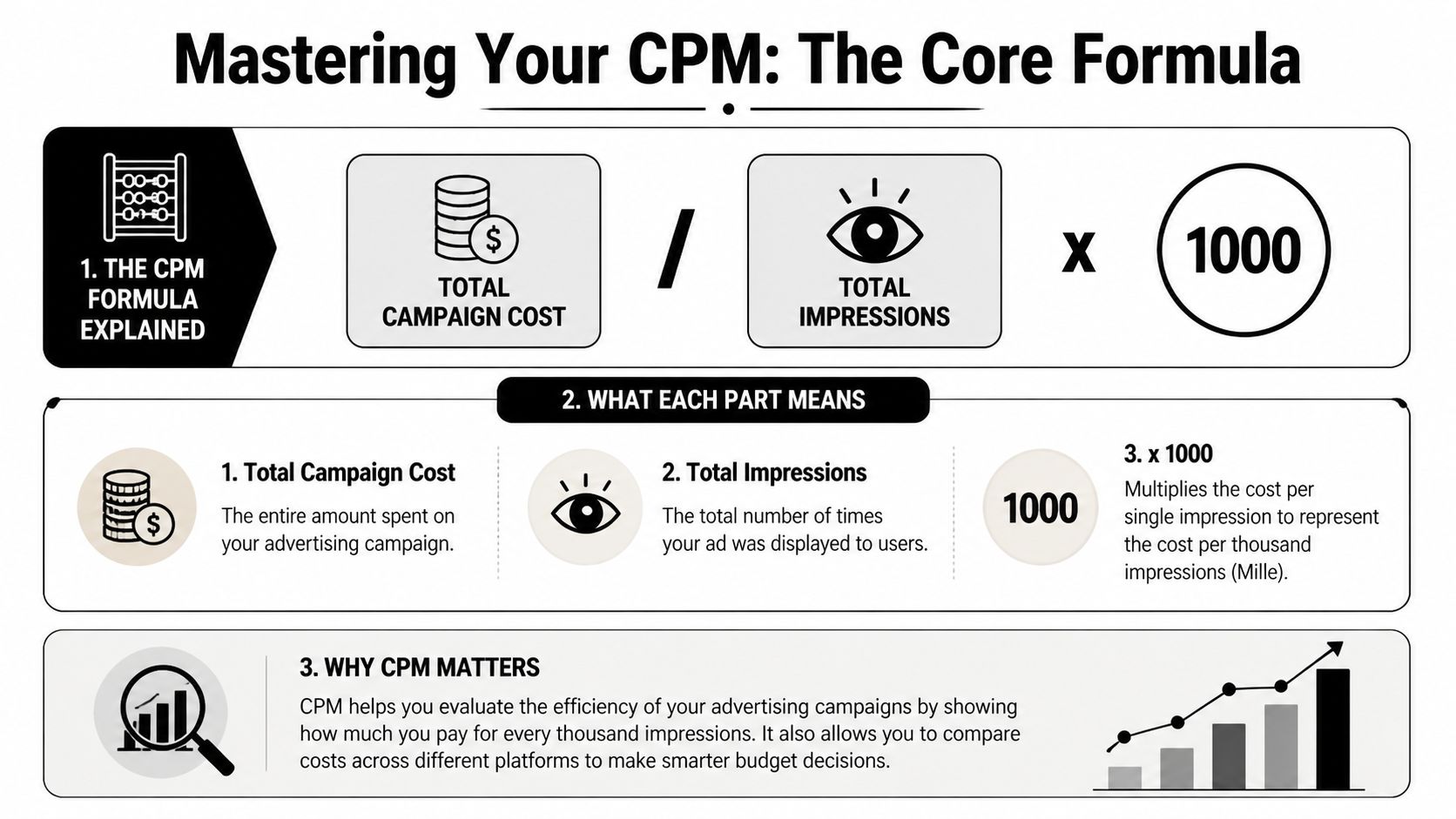
For a standard media buy, the formula usually behaves well:
- Total campaign cost is what you paid to run the campaign
- Total impressions is how many times the ad or piece of content was delivered
- × 1000 converts that unit cost into a price per thousand impressions
If you spent £500 and recorded 100,000 impressions, the calculation is:
(£500 / 100,000) × 1000 = £5 CPM
So you paid £5 for every 1,000 impressions delivered.
That part is easy.
The harder part is keeping the same counting rules across campaigns, especially once you compare display, paid social, whitelisted creator ads, and organic influencer posts in one report.
What should count as total cost
Cost definition changes the result fast. If finance books one number and the growth team reports another, your CPM trendline becomes useless.
For display and paid social, teams often separate two versions:
- Media CPM, which includes ad spend only
- Blended CPM, which includes ad spend plus management, platform, or agency costs
Both are valid. They answer different questions. Media CPM helps compare inventory efficiency. Blended CPM helps assess what reach cost the business.
Influencer campaigns need the same discipline, but with more judgment. Depending on the deal structure, total cost can include:
- Creator fees for posts, Stories, Reels, videos, or usage windows
- Gifted product if it had real cost and was part of the campaign agreement
- Shipping and fulfilment for seeding
- Production support such as editing, shoot assistance, or campaign-specific briefing
- Usage rights and paid amplification rights if you bought them
- Whitelisting spend if creator content also ran as paid media
I usually separate fixed creator costs from paid amplification costs first, then calculate CPM for each layer and a blended total. That makes trade-offs clearer. A creator package can look expensive on an organic CPM basis and still work well once the content is reused in paid.
What should count as impressions
Impressions are straightforward in ad platforms because the platform defines and reports them. Creator campaigns are less tidy. You need one rulebook before the campaign starts.
Count delivered exposure, not planning estimates.
A practical setup looks like this:
| Channel or format | Count this |
|---|---|
| Display ads | Reported impressions |
| Instagram Stories | Story views or opens reported by the creator or platform |
| Instagram Reels | Plays or views, using one definition consistently across all creators |
| TikTok posts | Video views from live campaign posts |
| Whitelisted creator ads | Paid impression data from the ad platform |
Consistency matters more than perfection. If one creator reports reach, another reports views, and a third sends screenshots with mixed metrics, you do not have a reliable CPM comparison yet.
That is one reason CPM gets messy in influencer marketing. The formula stays the same, but the exposure metric often needs manual validation.
A short video explanation can help if you want the visual version of the maths and terminology.
eCPM and why it matters
You do not need to buy inventory on a CPM basis to use CPM as an evaluation metric. If a campaign was bought on CPC, CPA, tenancy, or a flat creator fee, you can still convert delivery into eCPM, or effective cost per mille.
eCPM = (Total Spend or Revenue / Total Impressions) × 1000
For advertisers, eCPM creates a common comparison layer across pricing models. That is useful when one channel charges per click and another charges per creator deliverable.
In practice, eCPM is especially helpful in influencer work. A creator may charge a flat fee for one Reel and three Stories. Another may be paid on affiliate commission. eCPM lets you compare the price of attention across both, as long as the impression inputs are defined the same way.
vCPM and why served impressions can mislead
Standard CPM tells you what delivery cost. It does not tell you whether the placement had a reasonable chance to be seen.
That is the job of vCPM, or viewable CPM.
vCPM = (Total Campaign Cost / Viewable Impressions) × 1000
The Media Rating Council and IAB define a display ad as viewable when at least 50% of its pixels are in view for at least one continuous second. For large display units, the threshold is 30% of pixels in view for one second. For video, the standard is 50% of pixels in view for two continuous seconds, as outlined by IAB Europe’s viewability guidance: https://iabeurope.eu/knowledge-hub/viewability/
That distinction matters. A low CPM can hide weak visibility if a large share of served impressions never met a basic viewability threshold.
If viewability data is available, calculate both CPM and vCPM. Use CPM to price delivery. Use vCPM to price visible delivery.
For influencer campaigns, equivalent viewability data often does not exist. That does not make CPM useless. It means you should be careful about comparing creator-reported views with ad-server impressions as if they reflect the same quality of exposure.
Putting CPM Calculation into Practice
The formula is easy on a whiteboard. It gets more useful when you apply it to messy campaign data.
Example one with a straightforward display campaign
Say an ecommerce brand runs a banner campaign through a display network. The finance line item is clean. One invoice covers media spend. The reporting dashboard gives you impression totals directly.
You’d calculate CPM in three steps:
- Pull total campaign cost from the invoice or ad account
- Pull total impressions from the reporting platform
- Apply the formula and multiply by 1,000
That’s the ideal CPM environment because both inputs come from structured reporting. If the campaign spans multiple ad sets or placements, you can calculate CPM at both campaign and placement level to see where reach was cheapest.
Value becomes evident when you compare placements side by side. A homepage takeover may produce a higher CPM than standard display inventory, but that doesn’t automatically make it worse. It may be a premium placement with stronger visibility or brand fit.
Example two with an influencer campaign
Now take a restaurant chain running a local creator campaign across Instagram and TikTok. People often know how to calculate CPM in theory but struggle in practice.
The campaign includes:
- several micro-creators across multiple locations
- a mix of TikTok videos, Instagram Reels, and Stories
- creator fees
- comped meals
- light internal coordination
- unique promo codes and UTM links for attribution
The first job is to define total cost before content goes live. If you don’t, people will start removing “non-media” items later to make the CPM look prettier.
A practical creator campaign cost sheet usually includes:
| Cost category | Include it in CPM |
|---|---|
| Creator payment | Yes |
| Product, meals, or gifting used to secure content | Yes |
| Shipping or fulfilment | Yes if campaign-specific |
| Paid boosting budget behind creator content | Yes if you want blended CPM |
| Internal team salary allocation | Usually no for channel comparison, yes for full programme costing |
That last line matters. If you include internal labour for influencer and not for paid social, your comparison becomes distorted. Pick one rule and keep it.
Aggregating impression data without fooling yourself
The second job is to build one impression total from several content formats. This stage commonly marks the beginning of inaccurate CPM reporting.
A clean workflow looks like this:
- Collect post-level data from each creator after the reporting window closes
- Separate organic creator impressions from paid amplification impressions
- Use one counting rule per platform and stick to it
- Remove duplicate draft entries and expired screenshots
- Log missing data rather than estimating it
If one creator sends Story views, another sends reach, and a third sends only a screenshot of likes, you don’t have comparable impression data yet. You have fragments.
If the data source is inconsistent, the CPM is decorative, not decision-grade.
For a restaurant campaign, I’d usually calculate at least three versions:
- Organic influencer CPM based on creator fees, gifting, and organic content views
- Paid amplification CPM based on ad spend behind whitelisted or licensed content
- Blended campaign CPM combining all campaign cost and all campaign impressions
That split tells you far more than one single blended figure. Sometimes organic creator CPM looks high, but its value lies in the content becoming efficient once reused in paid. Sometimes the reverse happens. Cheap creator views don’t convert, while paid boosting on the best-performing assets does.
The practical lesson
Display CPM tends to be a reporting exercise. Influencer CPM is a data hygiene exercise first.
If you want a number that helps budgeting, negotiate reporting requirements before launch. Ask creators for platform-native screenshots, define the reporting window, specify what counts as delivery, and decide how usage rights and gifting will be treated in cost. Then your CPM means something.
Common Pitfalls That Invalidate Your CPM
A campaign wraps, the spreadsheet says your CPM was excellent, and the client still asks why nothing meaningful happened. That usually means the maths was clean and the inputs were not.
Trap one assuming the lowest CPM is the best CPM
Low CPM often just means you bought cheap inventory or broad, low-intent attention. In influencer marketing, that can hide a weak creator fit, poor audience geography, or content that gets served widely but drives no action.
A niche creator can look expensive on reach and still be the better buy. I see this often with local campaigns. A food creator with a smaller but relevant audience may produce a higher CPM than a broad lifestyle account, yet drive more bookings, code uses, or store visits.
CPM measures the price of exposure. It does not measure whether that exposure was worth buying.
Trap two combining projected, organic, and paid delivery into one number
Teams frequently break their own analysis at this stage.
Projected impressions from a media kit belong in planning. Delivered impressions belong in reporting. Paid amplification belongs in a separate line unless you are deliberately calculating a blended campaign CPM. Once those numbers get mixed together, the result looks tidy and becomes useless for budgeting.
Keep these splits intact:
- Projected impressions vs delivered impressions
- Organic creator delivery vs paid media delivery
- Platform-reported impressions vs creator-reported reach or views
That matters even more if you plan to repurpose influencer content for paid social ads. A creator post with average organic CPM can become very efficient once the paid team puts spend behind the right asset. If you merge those stages too early, you cannot tell whether the creator selection worked, the paid distribution worked, or both.
Trap three treating every impression as equal
Reported impressions are not interchangeable. A Story view, a feed impression, and a fast-scroll paid placement do not create the same level of attention.
The practical fix is simple. Pair CPM with a second quality signal that matches the campaign goal. For creator campaigns, that might be profile visits, link clicks, saves, promo code redemptions, or branded search lift in the days after posting. For paid amplification, compare CPM against click-through rate, hold rate, or conversion rate.
Cheap exposure that gets ignored is still expensive.
Trap four excluding costs that were required to get the impression
Creator fee is only part of the numerator. Product gifting, shipping, editing support, whitelisting access, usage rights, and paid media behind the asset all count if they were necessary to produce or distribute the content.
I also see the reverse mistake. Finance teams sometimes load influencer CPM with every internal salary and agency overhead line, then compare it against a platform CPM that includes only media spend. That comparison falls apart fast.
Use one cost standard per comparison group. If you want a true campaign CPM, include the full delivery cost. If you want a media efficiency comparison, keep the cost basis consistent across channels. If budget pressure is the primary problem, Ecommerce Boost's low budget strategies are a useful reminder that cheaper distribution only helps when the measurement rules stay consistent.
Trap five chasing a universal benchmark
There is no single good CPM across influencer, paid social, display, and local creator campaigns. The market, audience quality, creative format, and buying objective change the baseline.
Use comparisons that share the same job:
| Bad comparison | Better comparison |
|---|---|
| Influencer CPM vs search campaign CPM | Influencer CPM vs paid social awareness CPM |
| Premium video placement vs remnant display | Premium video placement vs other premium video buys |
| Local creator campaign vs national broad targeting | Local creator campaign vs other local creator tests |
The useful question is narrower and more honest. What did this impression cost, who saw it, and did that audience do anything that matters after exposure? In influencer work, that last part usually means tying CPM back to UTMs, landing page traffic, promo codes, or post-view behaviour instead of stopping at reach.
How to Optimise Campaigns Using CPM Data
CPM is often treated as a reporting output. Strong operators use it as a diagnostic signal.
Read CPM changes like a campaign health check
A rising CPM often means something changed in the auction or in the audience response. Sometimes the cause is market competition. Often, it’s your own campaign wearing out.
If CPM climbs while click-through rate softens and conversion rate doesn’t improve, I’d look at creative fatigue first. The audience has seen the same asset too often, or the hook is no longer earning attention.
If CPM rises only for one audience segment, the issue may be saturation or a narrow targeting pool. If it rises on one placement but not another, inventory quality or placement competition may be the cause.
A simple operating pattern works well:
- CPM up and engagement down means refresh creative
- CPM up in one audience only means widen or rotate targeting
- CPM stable but CPA worsening means the issue probably sits after the impression, not in the media cost
- CPM higher on creator content but CPA lower means don’t optimise the creator content away too quickly
Use CPM to test creative, not just channels
Creative testing becomes sharper when you evaluate reach cost alongside downstream action. A thumb-stopping visual might lower CPM because platforms serve it more willingly. A stronger offer message might hold CPM flat but improve click and conversion quality.
The best way to read it is in combinations:
| Pattern | Likely takeaway |
|---|---|
| Lower CPM, weak clicks | Cheap reach, weak message or low-intent audience |
| Higher CPM, strong clicks | More expensive attention, but more relevant |
| Flat CPM, better conversions | Landing page, offer, or audience fit improved |
| Rising CPM, falling conversions | Fatigue, weak relevance, or audience saturation |
That’s why repurposing matters. Creator content often behaves differently once you use it in paid channels. If you’re building a testing workflow, this guide on repurposing influencer content for paid social ads is a practical next read because it shows how to turn creator assets into a broader testing library.
Optimise the lever that CPM is actually pointing at
CPM can suggest where to look, but it doesn’t always tell you what to change. The adjustment depends on the pattern.
When reach gets expensive, the usual levers are:
- Creative angle. New first seconds, different framing, stronger visual contrast.
- Audience design. Broaden, split, or exclude tired segments.
- Placement mix. Remove inventory that inflates cost without helping quality.
- Format choice. Short-form video, static, Stories, carousels, and creator-style edits won’t all price the same way.
- Frequency control. If the same people keep seeing the same asset, cost often worsens before results do.
Smaller budgets need tighter trade-offs here. If you’re under pressure to stretch spend rather than scale it, Ecommerce Boost's low budget strategies offer useful ways to prioritise channels and creative decisions without relying on large media budgets.
Don’t optimise CPM in isolation
This is the mistake that burns experienced teams too. They lower CPM and subtly wreck business performance.
A campaign can become “more efficient” on paper because it reaches broader, cheaper audiences who never buy. Another campaign can look expensive because it targets a denser, more valuable audience that converts well.
The right question isn’t “How do we lower CPM?” It’s “How cheaply can we buy the right attention without hurting results further down the funnel?”
That’s the shift from media reporting to media strategy.
Tracking and Attributing Success Accurately
A CPM calculation is only as trustworthy as the tracking behind it. If cost is incomplete or impressions are inconsistently reported, the output won’t help you make budget decisions.
That problem gets sharper in influencer marketing because campaign data sits across creators, platforms, links, promo codes, and internal payment records. The fix is operational, not theoretical.
The measurement stack that keeps CPM honest
For creator campaigns, three pieces matter most:
- UTM parameters let you track traffic from a specific creator, platform, and post into Google Analytics or your attribution stack.
- Unique promo codes tie conversions back to the creator even when the buyer doesn’t click the tracked link.
- Central campaign reporting keeps content delivery, spend, and response metrics in one place instead of scattered screenshots.
UTMs help with click-based journeys. Promo codes catch the messy real-world behaviour that creator campaigns often produce, especially for mobile shoppers and restaurant customers who see content first and convert later.
Closing the loop from reach to return
CPM tells you what attention cost. Attribution tells you what that attention produced.
When you combine creator-level UTMs, promo codes, and campaign cost records, you can move from “this creator got views” to “this creator produced measurable traffic and sales”. That’s the difference between influencer marketing as content activity and influencer marketing as a performance channel.
If you want to connect those dots further, this practical guide to ROAS is a useful companion metric, and this framework for measuring influencer marketing ROI shows how to evaluate creator work beyond surface reach.
Good CPM reporting starts long before the campaign ends. It starts when you define your cost rules, your impression rules, and your attribution setup before a single post goes live.
If you want a simpler way to run creator campaigns with built-in tracking, promo codes, UTM links, content collection, and clear attribution, Sup helps brands launch and measure influencer campaigns without the usual spreadsheet chaos.
More on tracking
See how many creators post about you and your competitors
Type in your brand's Instagram handle and we count the creators who post about you and about your five closest competitors. It takes about a minute and it is free. Or request a demo and we will show you the creators in your niche and walk you through the dashboard.
 Book a call